emAIl Sentinel Pro is the always-on edition of our email alerting tool — Outlook, Gmail, and any IMAP mailbox. It runs on your own server and fires real-time alerts the moment important mail arrives — even when your computer is off. Plain-English rules, the AI of your choice, your data on your own infrastructure.
No credit card for the trial · Cancel anytime · Outlook, Gmail, and IMAP
Our Lite add-ins for Outlook and Gmail are genuinely useful — but Microsoft and Google don't let an add-in run in the background. So they can only scan while the pane is open, and they go dark the moment you close it. Pro removes that limit entirely.
A small always-on service watches your mail every minute and via real-time push — nights, weekends, and while your laptop sleeps.
Microsoft Graph subscriptions and Gmail push deliver new mail the second it lands — no waiting for you to open anything.
Self-hosted on a box you control. Mailbox tokens, AI keys, and alert credentials are encrypted at rest. Nothing is hosted by us.
Same plain-English rules and channels you already know, now running without you.
Watch any number of mailboxes, mixed and matched, from one place — including Proton (via Bridge), Fastmail, iCloud, Yahoo, Zoho, or your own mail server. IMAP needs no app registration at all.
Claude, ChatGPT, Gemini, Azure/Copilot, or any compatible model — per account. Bring your own key.
SMS, Microsoft Teams, Google Chat, Outlook Calendar, To Do, Excel, OneNote, Google Calendar/Tasks/Sheets/Docs, and custom webhooks.
“Text me if a customer mentions cancelling.” The AI decides; the alert writes itself.
Defer off-hours mail and catch up automatically — no 2 a.m. pings unless you want them.
One Docker command on a small VM, or an installer for Windows, macOS, and Linux that starts with your machine. The same application either way.
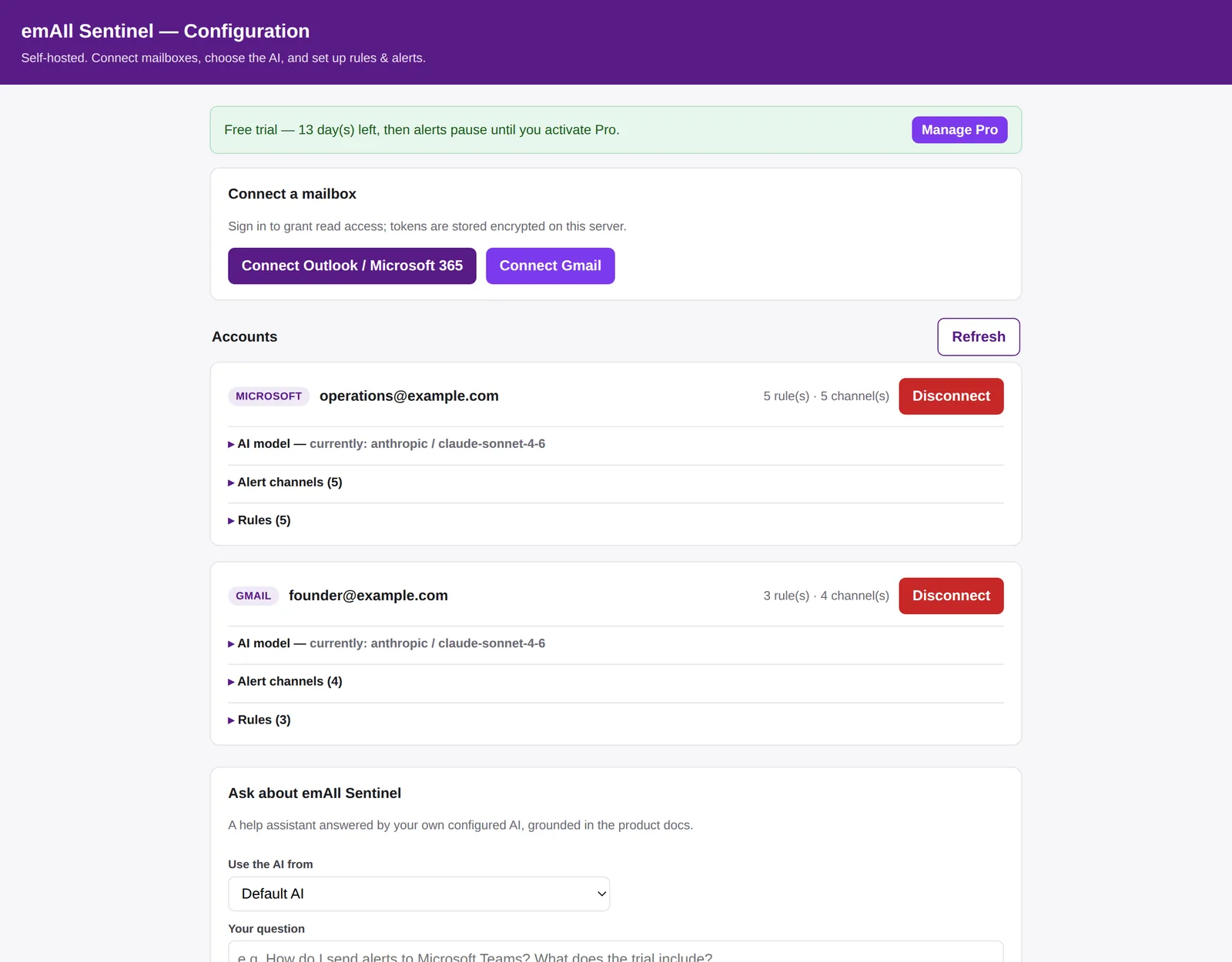
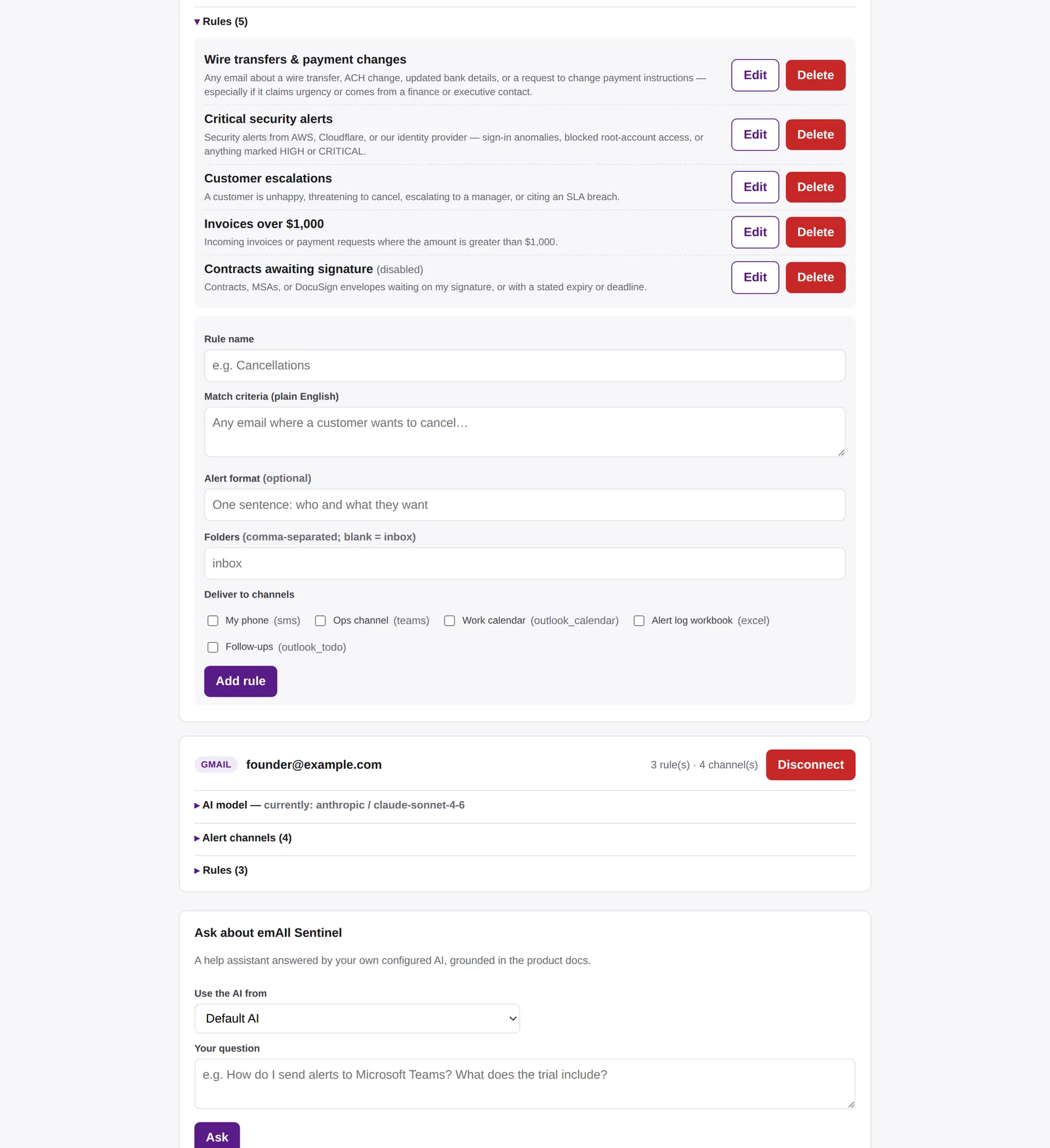
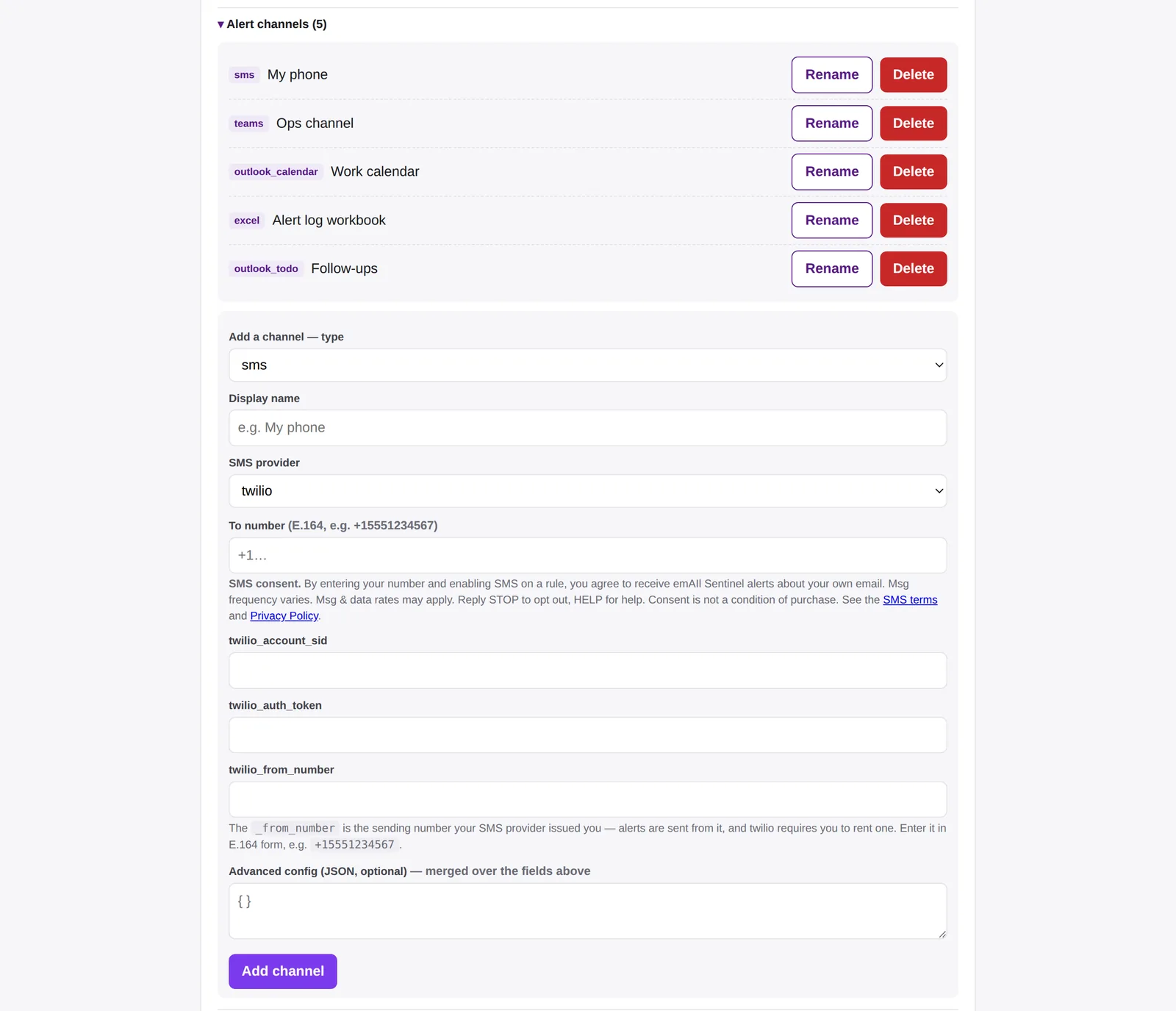
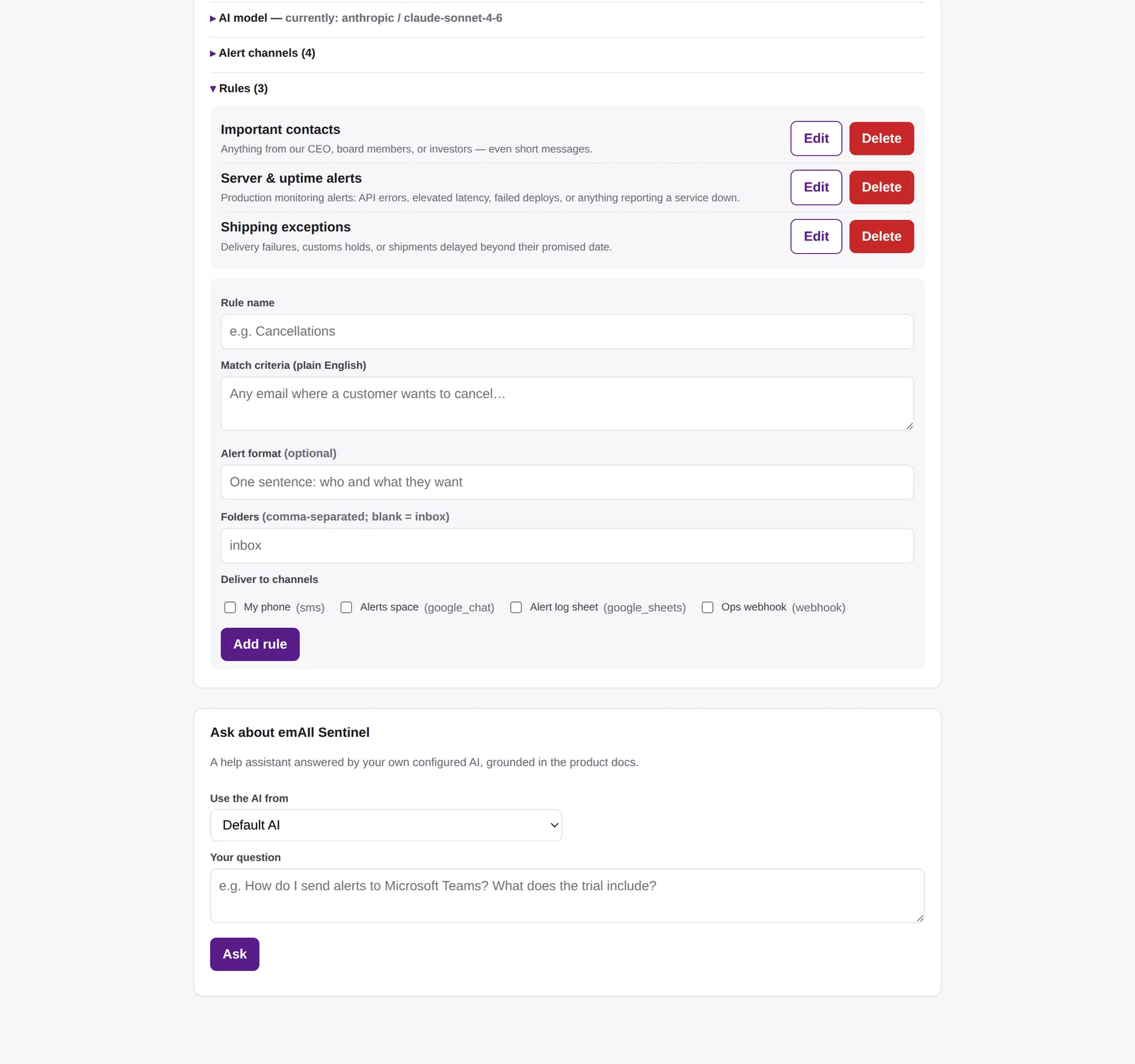
The web console runs on your own server. Connect mailboxes, choose the AI, write rules and add alert channels; nothing else to install.


Click any screenshot to open it full size.
Same features. The difference is automation.
| Capability | Lite (free add-ins) | Pro |
|---|---|---|
| Plain-English AI rules, all alert channels | ✓ | ✓ |
| Unlimited rules and mailboxes | ✓ | ✓ |
| Runs while the add-in is open | ✓ | ✓ |
| Runs 24/7 when your computer is off | — | ✓ |
| Real-time push (instant alerts) | — | ✓ |
| Outlook, Gmail, and IMAP in one place | one at a time | ✓ |
| Where it runs | Inside Outlook or Gmail | Your own server, or Windows / macOS / Linux |
| Price | Free | Subscription or lifetime |
Pick the shape below — a container on a server, or an installer on your own computer. Nothing to build, and nothing to upload to the server.
Sign in to Outlook or Gmail, or point it at any IMAP server, and add your AI key. Tokens are stored encrypted on your server.
Write rules in plain English, pick channels, and you're done. It watches from then on — automatically.
The same build, packaged for wherever you want it to live.
docker compose up -d pulls a published multi-architecture image — x86-64
and ARM, so a Graviton or Ampere VM runs it as-is. The compose file and the environment
template ship inside the image, so there is nothing to upload to the box. On a
fresh Ubuntu VM, one command installs Docker, issues an HTTPS certificate and starts the
stack. Guides for AWS, Azure, Google Cloud, DigitalOcean, Hetzner, Linode, Vultr and
Oracle Free.
The same container, on hardware you already own. A Raspberry 4 or 5 runs the
published arm64 image as-is — no separate build — and costs a few dollars a
year in electricity instead of a monthly bill. A Cloudflare Tunnel gives
it a public HTTPS address without opening a single port on your router, so mail providers
can reach it and nothing on your home connection is listening. Use an SSD rather than an
SD card: the database writes constantly, and cards fail slowly enough to look like
software bugs. The same guide covers a NAS that runs Docker, a mini-PC, or an old laptop
with the lid shut.
Installers that behave like ordinary software: setup.exe for Windows
10/11, a .pkg for macOS 12+ on Apple Silicon, and .deb /
.rpm for Debian, Ubuntu, Fedora, and RHEL. Each one starts the app when you
sign in, puts the settings page at localhost:8000, upgrades in place and
uninstalls cleanly. Plain single-file binaries are published too, for machines where you
cannot install packages.
Every release ships a full source archive next to the binaries — including the deploy and database-migration tooling — for reading it, auditing it, or running it your own way. SHA-256 checksums are published for every file in the release.
Which one do I want? On your own machine it checks every minute while that machine is on. Anything always-on — a VM, or a Pi in a cupboard — also takes real-time push from Microsoft Graph and Gmail, so alerts fire the second mail lands. That is the 24/7 story, and it costs either a 1–2 vCPU VM at roughly $5–15 a month, or a one-off Pi and a few dollars a year of electricity.
Same software on every plan. Self-hosted on your own infrastructure. 14-day free trial. Every plan covers everyone on your install — no per-person fees.
or $150/year — two months free
The 14-day trial runs after you install it — no card needed. Install it first
$199 — launch price for the first 100 buyers
One-time payment · the 14-day trial runs after you install it, no card needed. Install it first
or $490/year — two months free
The 14-day trial runs after you install it — no card needed. Install it first
Eighteen short walkthroughs, one per topic, from first run to shared mailboxes. Play them here or open the playlist on YouTube.
1:00
0:46
0:31
0:23
0:33
0:59
0:43
1:12
1:12
1:11
0:56
0:36
0:38
0:38
0:34
0:29
0:32
0:41Videos play here without loading anything from YouTube until you press play.
Yes — that's the point. Pro runs on a server or computer you control, so your mailbox tokens and AI keys never touch our systems. It installs with one Docker command on a small VM — a $5–15/month box is plenty — on always-on hardware you already own, like a Raspberry Pi, a NAS or a mini-PC, or with an installer for Windows, macOS or Linux if you would rather run it on your own machine.
Nothing is locked behind a receipt — the container image is public, so you can install it and run the 14-day trial before paying anything: docker pull ghcr.io/jjjjj-enterprises/email_sentinel. Buying sends you a license key by email, and that key is what keeps alerting on once the trial ends. Lose it and we can re-send it from your purchase address.
Yes — there are installers for Windows, macOS, and Linux, and the app starts when you sign in. The trade-off is honest: on your own machine it checks every minute while the machine is on, so it stops watching when the machine sleeps. Real-time push and genuine around-the-clock alerts need an always-on server.
Yes, and it's the cheapest way to run it around the clock — a few dollars a year in electricity instead of a monthly VM bill, on hardware you own. The container image is built for ARM as well as x86, so a Pi 4 or 5, a Docker-capable NAS, or a mini-PC all work. The one extra step is that a box at home has no public address, so the guide sets up a Cloudflare Tunnel — which needs no ports opened on your router. See the install guides for the full walkthrough.
Features are identical. The add-ins (Lite) can only scan while their pane is open — a hard limit Microsoft and Google place on add-ins. Pro runs continuously and pushes alerts in real time, even when your computer is off.
Whichever you want — Claude, ChatGPT, Gemini, Azure/Copilot, or any compatible model, set per mailbox. You bring your own API key, so AI usage is billed to you at cost.
Personal covers you, your household, and your work as a sole practitioner — a freelancer or independent consultant with no employees. Business is for use by or on behalf of a company with employees, or use for an employer. It is the same software either way; neither plan counts heads, so the price never changes as your household or your team grows.
The right to run emAIl Sentinel in your company, and your support questions answered ahead of the queue. The software is identical on every plan — there are no locked features and no seat counting. emAIl Sentinel is a small independent product, so no plan carries a guaranteed response time — Business simply goes first in the queue.
A lifetime license would mean supporting a company for as long as the product exists on a single payment, and that is not an open-ended commitment we will take on. The Personal lifetime license stays exactly as it is.
Yes, at no extra charge. One license covers everyone in your household — there is no per-person fee and no seat limit. Each person gets their own sign-in and sees only their own mailboxes, rules and alerts; you cannot read theirs and they cannot read yours. You can deliberately share an alert channel, an AI key, or a rule with each other, and take any of it back at any time.
Same software either way; it's just how you pay. The subscription ($15/mo or $150/yr) includes updates and support while active. The lifetime license (launch price $149 once, normally $199) never expires and includes all future updates — no recurring fees. Both are self-hosted on your own server.
The Pro software, updates, and support — you provide the server, AI key, and SMS account. If a subscription lapses, the app keeps running but stops sending alerts until you renew; a lifetime license never lapses.
Yes. Every install includes a 14-day full-feature trial with no key required. Buy a subscription or lifetime license whenever you're ready and paste the license key into your server.
No — by design. Alerts go to SMS, Teams, Google Chat, calendars, task lists, spreadsheets, notes, and webhooks, so an alert never gets buried in the very inbox you're watching.