Outlook Add-in · Powered by Azure OpenAI · Microsoft AppSource

Your Outlook inbox,
under watch.

emAIl Sentinel™ for Microsoft 365 reviews new Outlook mail against your plain-English rules and alerts you across SMS, Microsoft Teams, Outlook Calendar, Excel, To Do, OneNote, MCP servers, or any HTTPS webhook. It scans while the task pane is open — for always-on 24/7 monitoring even when Outlook is closed, step up to the self-hosted Pro edition.

Works inside Outlook 9 alert channels In private testing Powered by Azure OpenAI

emAIl Sentinel 365 — Rule Editor
// ACTIVE RULE:
loading…
Current status

In private pre-launch testing

emAIl Sentinel for Microsoft 365 is currently in private testing with a closed group of users. Public availability via Microsoft AppSource is planned; general sign-ups are not being accepted at this time.

The intended SMS use case is self-notification and small-team alerting — the installing user texts themselves or a small number of colleagues / on-call recipients about email they already have a business reason to see. Users bring their own SMS provider credentials, are the legal sender of every message dispatched on their behalf, and are responsible for TCPA, CAN-SPAM, and carrier-policy compliance under our Terms § 4.1. Use for unsolicited bulk or promotional SMS is expressly prohibited. For inquiries, press, or carrier / compliance review, contact sentinel-support@jjjjjenterprises.com.

How it works

Three steps to never miss an important email again

01

Install in Outlook

Add emAIl Sentinel from Microsoft AppSource. It lives in your Outlook ribbon and reading pane — no separate app, no extra login, works on web and desktop.

02

Write plain-English rules

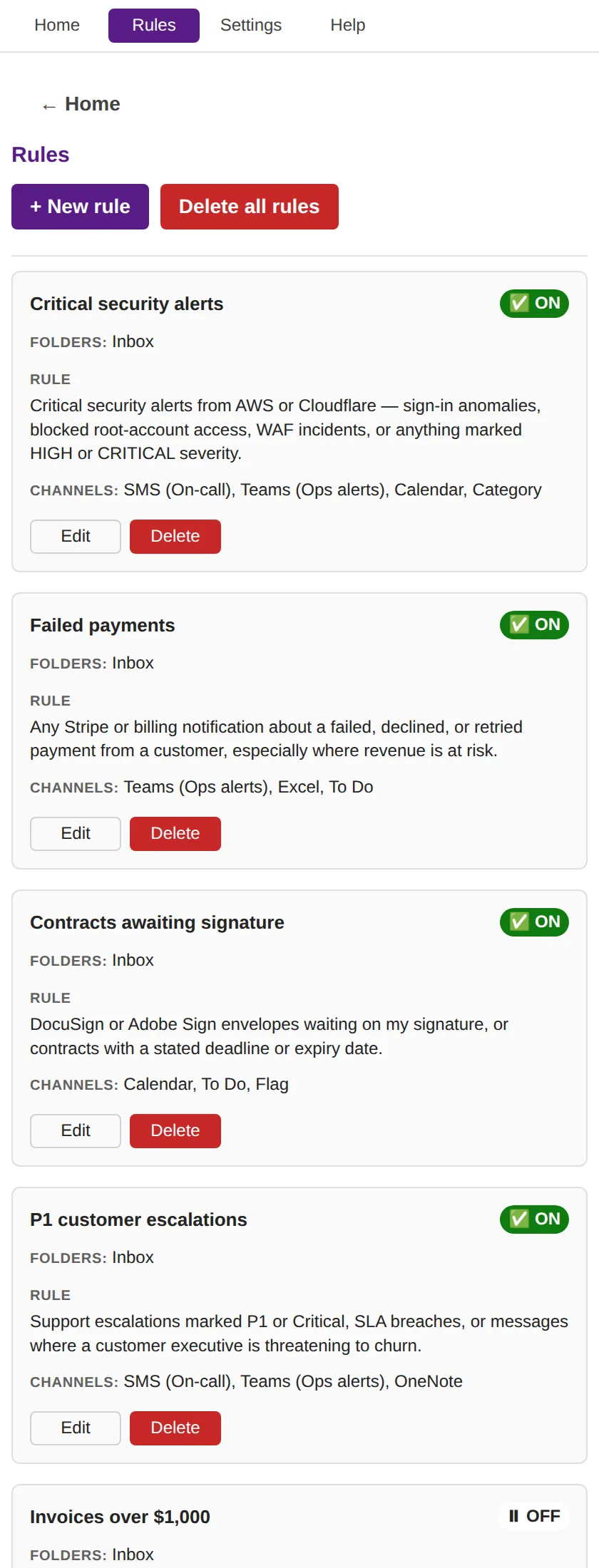
Tell Sentinel what to watch for in natural language. "Any email from anyone @vendor.com that has a PDF attachment that looks like an invoice." Azure OpenAI handles the interpretation — no regex, no code.

03

Get alerted across 9 channels

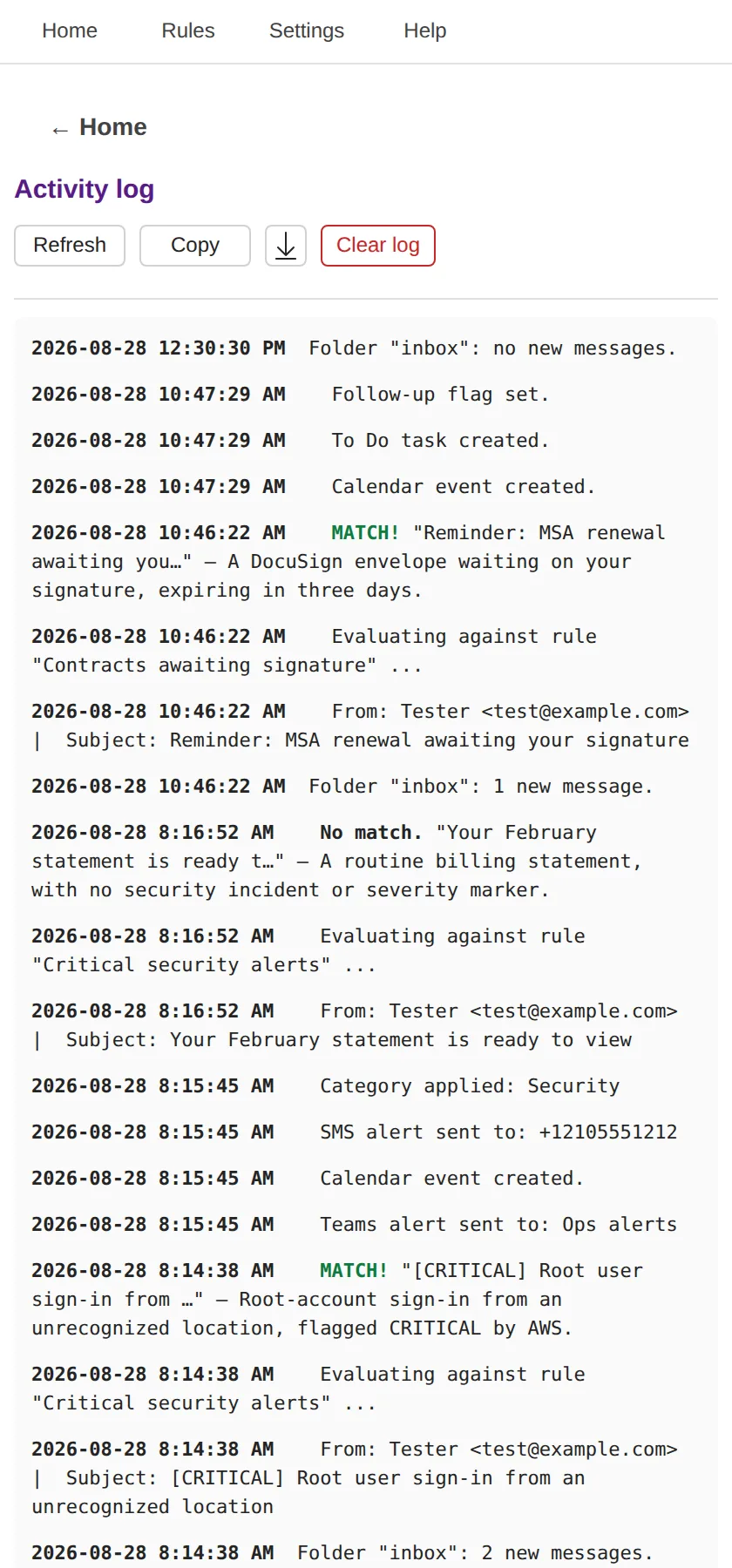
When emAIl Sentinel checks your inbox — when you open the pane, resume, or hit Scan email now — matching mail dispatches alerts via SMS, Teams, Calendar, Excel, To Do, OneNote, MCP, or webhook, per rule.

See it in action

What it looks like inside Outlook

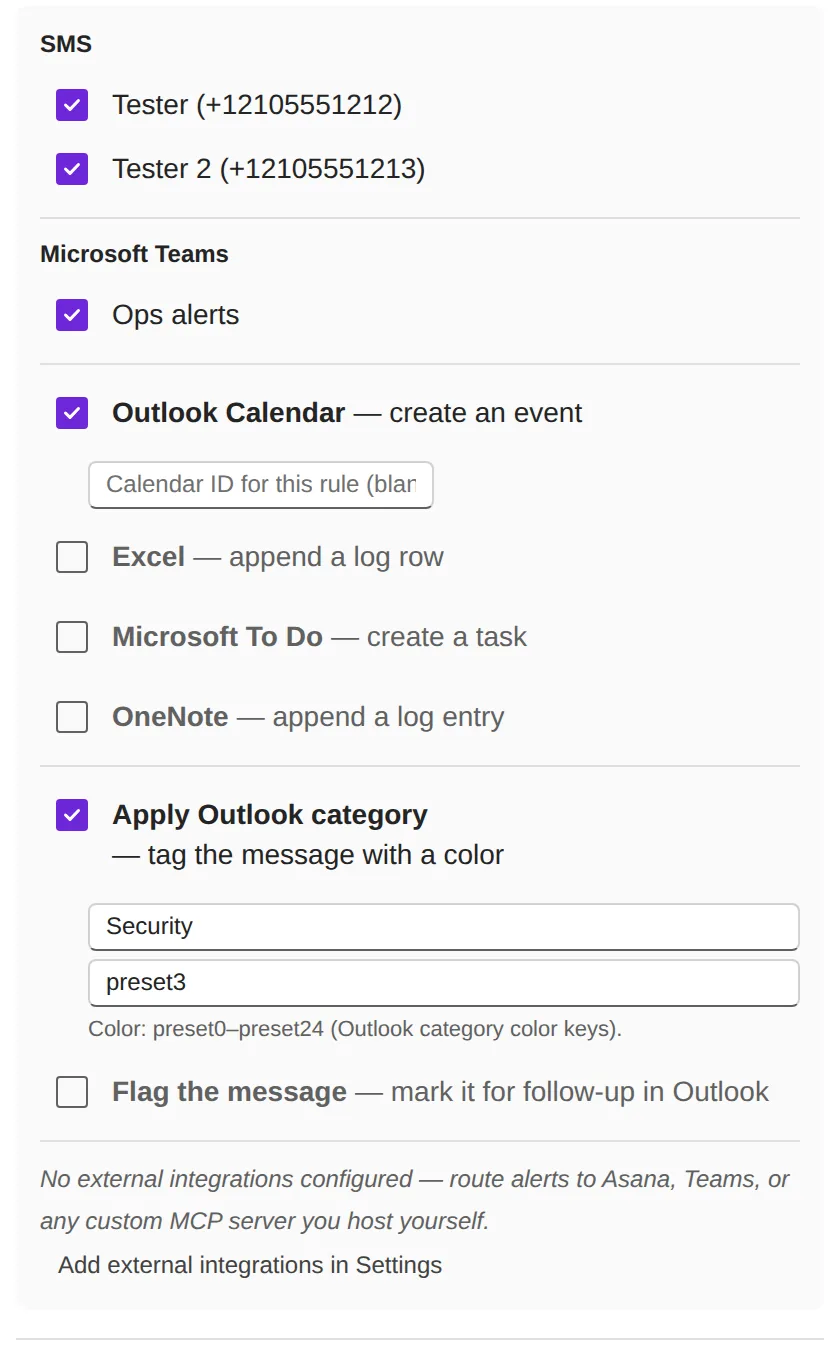
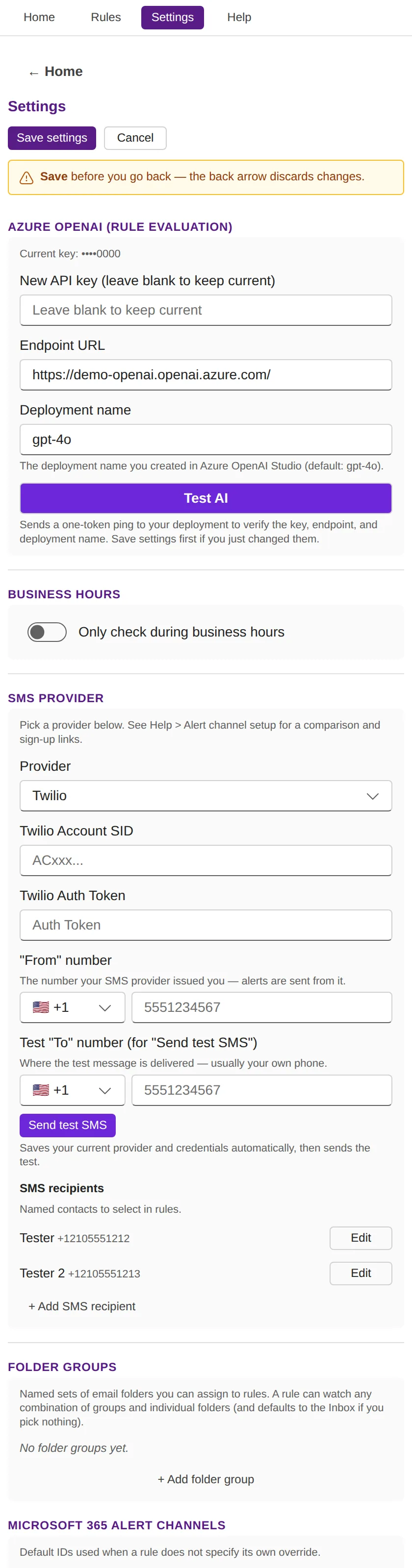
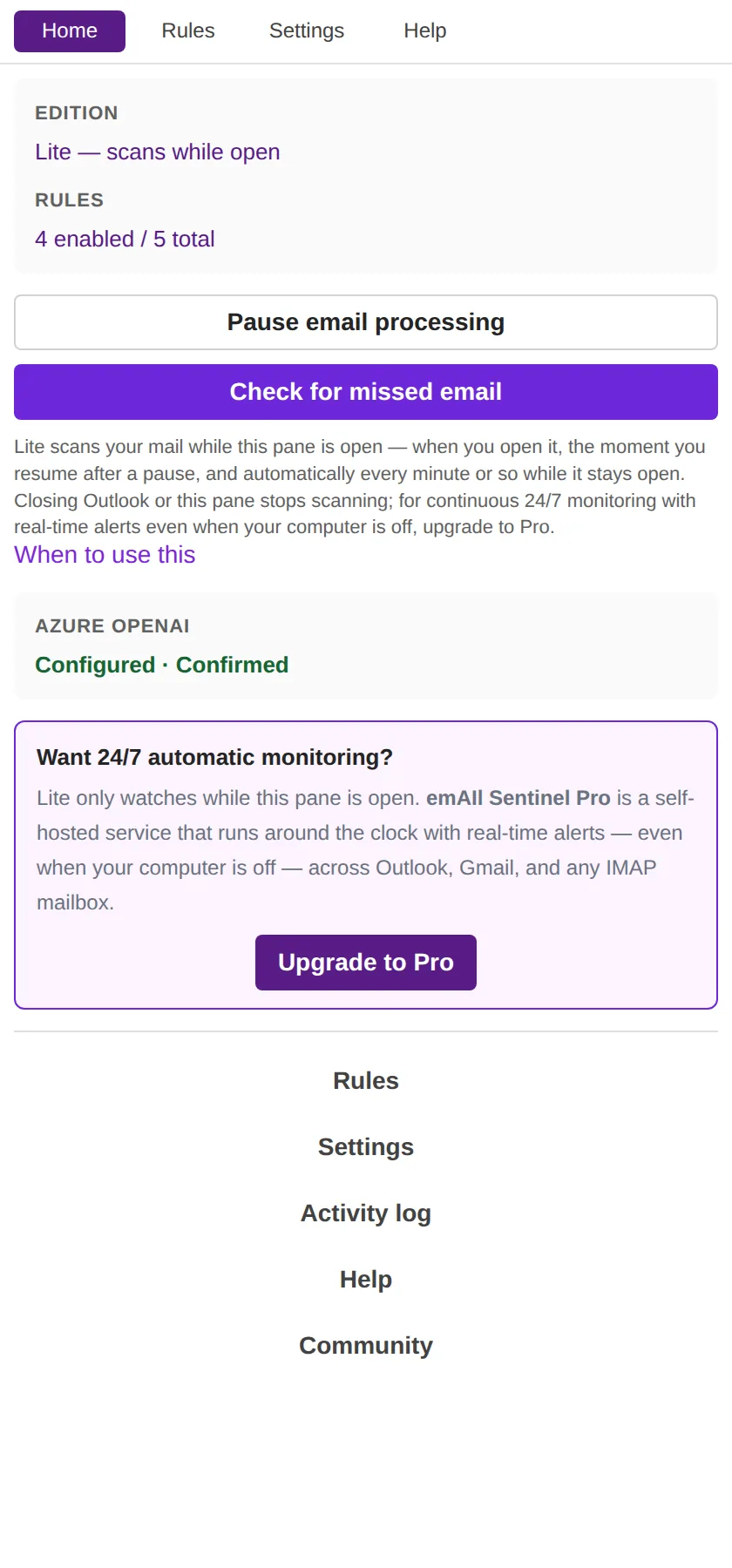
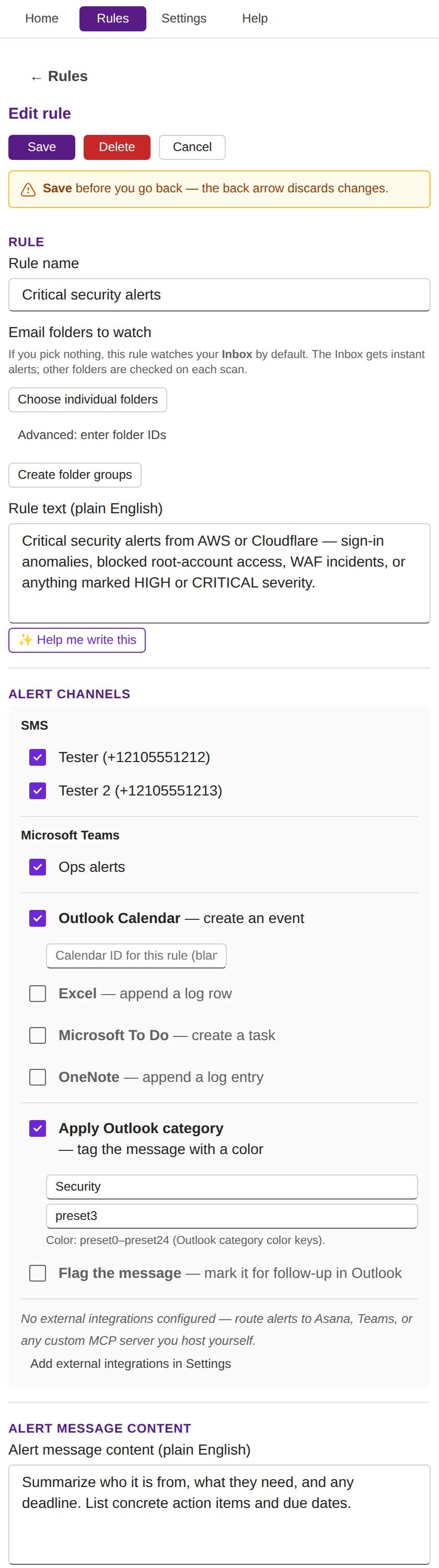
Real screens from the add-in task pane: home, the rule editor, alert channels, the activity log, and settings.

Click any screenshot to open it full size.

Features

AI triage,
right inside Outlook

Runs entirely inside Outlook — no separate app, no backend. Everything you need to stay ahead of your inbox; for continuous 24/7 monitoring, see the self-hosted Pro edition.

📥

Lives inside Outlook

No context switching. emAIl Sentinel runs in your Outlook ribbon and reading pane via the Microsoft 365 Add-in framework — React + Fluent UI v9, where you already work.

⚡

Catch-up scanning, no timers

When you open the task pane, resume from pause, or click Scan email now, emAIl Sentinel uses Microsoft Graph delta queries to find and evaluate everything new since the last check — no polling timer to configure. For continuous 24/7 monitoring even when Outlook is closed, the self-hosted Pro edition has you covered.

🧠

Azure OpenAI evaluation

Every new message is analyzed by your own Azure OpenAI deployment against your rules. Choose gpt-4o-mini for the cost-effective default, or step up to gpt-4o for nuanced rules.

📱

Bring your own SMS

Six quick-start providers: Twilio, Telnyx, Plivo, ClickSend, Vonage, Textbelt — plus a generic webhook for any other provider. You keep your credentials, you stay in control.

🔔

Nine alert channels

SMS, Teams, Outlook Calendar, Excel (OneDrive), Microsoft To Do, OneNote, Outlook Category, Follow-up Flag, and any MCP server or HTTPS webhook (Slack, Discord, n8n, Zapier, custom internal APIs).

🔒

Per-user, per-add-in storage

All settings live in Office.context.roamingSettings — private to your Microsoft 365 account, encrypted, synced across devices. No backend database, no shared state.

Alert channels

Alerts wherever you already are

No new app to check. Alerts land in the Microsoft 365 tools you live in every day — including your phone.

📱 SMS BYO
💬 Microsoft Teams
📅 Outlook Calendar
📊 Excel (OneDrive)
✅ Microsoft To Do
📓 OneNote
🏷️ Outlook Category
🚩 Follow-up Flag
🔌 MCP / Webhook
Watch it work

Short walkthroughs, one per topic

Ten videos, each under two minutes, covering install, rules, every alert channel, and the activity log.

▶  Watch the whole playlist on YouTube

Videos play here without loading anything from YouTube until you press play.

Pricing

The add-in is free. All of it.

No rule cap, no locked channels, no trial clock. The only paid product in the suite is emAIl Sentinel Pro — the self-hosted edition that keeps watching when Outlook is closed.

Outlook add-in
$ 0 /forever

Everything on this page, at no cost.

  • Unlimited rules
  • Automatic catch-up scan on open
  • Manual Scan email now on demand
  • Every channel — Teams, Calendar, Excel, To Do, OneNote, Category, Flag
  • MCP servers & custom HTTPS webhooks
  • SMS via any provider (BYO)
  • AI-assisted rule writing and alert content
Contact us →
In private testing — coming to Microsoft AppSource.

Plus your own Azure OpenAI usage. emAIl Sentinel makes two API calls per matched email per active rule (one to evaluate, one to format the alert). With gpt-4o-mini, typical personal use runs well under $1/month in Azure costs.

Security & Privacy

Your data stays in your Microsoft 365 account.

No backend. No shared database. No data broker deals. Just your Microsoft 365 account, your Azure OpenAI key, and the alert channels you choose.

🔒

Runs in your Microsoft 365 account

Everything executes in the Outlook add-in runtime under your own Office SSO + MSAL.js fallback. We have no backend that sees your mail.

🔑

Encrypted at rest

Azure OpenAI credentials, SMS keys, rules, and settings live in Outlook's encrypted roamingSettings — per-user, per-add-in, private to you.

🛡️

AppSource validation

Distributed exclusively through Microsoft AppSource, which subjects every add-in submission and update to Microsoft's validation review.

🇺🇸

US-only, CCPA-aligned

Currently offered exclusively to US users. Subprocessor list and CCPA / 15-state privacy disclosures in the privacy policy at launch.

Why we don't run our own backend — and why that's a feature

Many email-monitoring products run a server-side backend that polls Outlook every minute and pushes results into a custom UI. To do that, those products must:

  • Store your Microsoft OAuth refresh tokens on their servers
  • Route every email's content through their infrastructure
  • Read and process each message outside your own Microsoft 365 account

We deliberately don't. emAIl Sentinel runs entirely inside your own Microsoft 365 account. Your email content never reaches our servers — we never see, store, or process it. The only places your email data ever goes are (1) your own Azure OpenAI endpoint, called with your API key and deployment, and (2) the alert channels you configure (your SMS provider, your Teams channels, your Calendar, your Excel workbook, your MCP server).

The trade-off: with no backend, emAIl Sentinel detects new mail as a catch-up scan — when you open the task pane, resume from pause, or click Scan email now, it uses Microsoft Graph delta queries to find and evaluate everything new since the last check. There's no background process while the pane is closed. If you need continuous, 24/7 monitoring even when Outlook is closed, that's exactly what the self-hosted Pro edition adds — running on infrastructure you control.
From JJJJJ Enterprises

Our other endeavors

More tools built to make your professional life easier.

emAIl Sentinel for Gmail
Gmail Edition

emAIl Sentinel™ for Gmail

Same product, Google Workspace edition. Watches Gmail labels with Gemini-evaluated rules and fires alerts via SMS, Chat, Calendar, Sheets, or Tasks.

Visit emailsentinel.jjjjjenterprises.com →
Training & Education

PilotTrainerHQ

Comprehensive pilot training resources and tools to help student pilots and instructors navigate the path to certification.

Visit pilottrainerhq.com →
Aviation Reference

PlaneFacts

Your go-to resource for aviation facts, aircraft specifications, and reference information for pilots and aviation enthusiasts.

Visit planefacts.online →
Need it always-on?

Meet emAIl Sentinel Pro

This free add-in scans while its pane is open. Pro is the self-hosted edition that watches Outlook (and Gmail) 24/7 and fires alerts in real time — even when your computer is off. Same plain-English rules; your AI, your server, your data.

Explore Pro →